Choosing an OBD2 Scanner: What Actually Matters (and What Doesn't)
Every car built since 1996 in the US has the same diagnostic port under the dashboard, and a tool that plugs into it turns a check engine light from a mystery into a five-character code. That is the entire value proposition, and it is a good one: a $25 tool routinely saves a $130 diagnostic fee on the first use.
The market is confusing on purpose, so this guide is organised by what you actually get at each price tier rather than by brand. The honest summary up front: most people need the cheapest tier, some people benefit from the middle tier, and almost nobody who is not a professional needs the top tier.
What does every OBD2 scanner do?
Reads and clears engine trouble codes. Shows freeze-frame data — a snapshot of sensor values at the moment the code set, which is genuinely useful context. Reports I/M readiness, telling you whether the emissions monitors have completed, which is exactly what you want to know before an inspection.
That baseline is available for around $20–$30, and it covers the single most common scenario in car ownership: the check engine light came on, and you want to know what it says before anyone quotes you anything.
Tier 1: basic code readers, roughly $20–$40
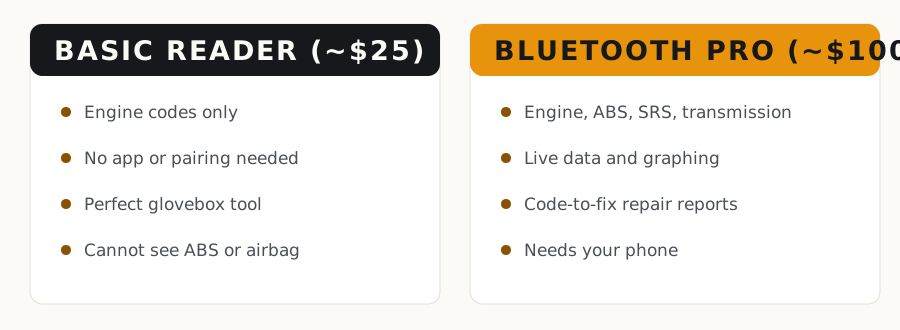
A wired handheld with a small screen. Plug in, read code, clear code, unplug. No app, no pairing, no battery to charge, nothing to update. The ANCEL AD310 has been the reference point in this category for years for good reason — it does one job reliably at a price that makes it a glovebox item rather than a purchase decision.
This is the right tool for most drivers. If your goal is 'tell me what the light means so I'm not walking into a shop blind', this tier is complete. Its limits: engine codes only, no ABS or airbag, no live data streaming, no manufacturer-specific enhanced codes.
Tier 2: Bluetooth dongles and app tools, roughly $60–$130
A small dongle that stays in the port and pairs with your phone. The step up is real: full-system access on most vehicles (ABS, SRS/airbag, transmission, HVAC), live data you can graph while driving, and — the actual headline feature — repair guidance that maps codes to verified fixes for your specific year, make, model and engine.
The BlueDriver Bluetooth Pro is the long-standing default recommendation in this tier, and the reason is software rather than hardware: its repair reports draw on a large database of verified repairs, which is what turns 'P0301' into 'on your engine, this is usually the coil, and here is the evidence'. OBDLink MX+ is the alternative for people who want faster live data and prefer third-party apps.
This is the tier worth paying for if you keep cars past warranty, do any of your own work, or want to check a used car properly before buying.
Tier 3: bidirectional tablets, $300+
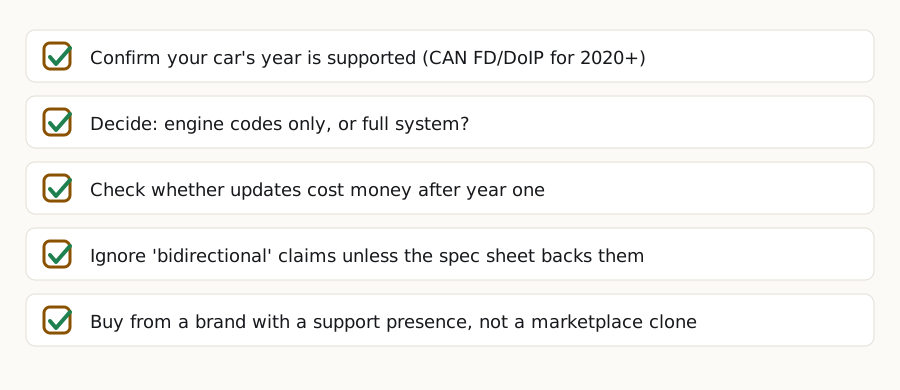
'Full system' and 'bidirectional' get used interchangeably in marketing, and they are not the same thing. Full system means the tool can read codes from every module. Bidirectional means it can command those modules to do things — cycle an ABS pump, fire an injector, run an actuator test. Bidirectional is a genuine professional capability and it is what the price jump buys.
Unless you are doing your own brake bleeding on an ABS-equipped car, performing service resets, or working on cars as a side business, this tier is more tool than the job needs. If you do go here, the thing to check is the update cost: several manufacturers include one to two years and then charge $100–$150 annually, which changes the three-year cost dramatically.
What should I avoid when buying a scanner?
Subscription traps. Some consumer tools attach a monthly or annual fee to features you would reasonably expect to be included. Read what stops working when you stop paying — some become basic readers.
Ultra-cheap generic ELM327 clones from marketplace sellers. They are inconsistent, frequently mis-report, and occasionally cause communication problems on the vehicle bus. The saving over a reputable $25 reader is not worth the uncertainty when the whole point is trustworthy information.
And check protocol compatibility if you drive something recent: newer vehicles increasingly use CAN FD and DoIP, and older tools simply cannot talk to them. If your car is a 2020 or newer, confirm support before buying.
Getting value out of it once you own one
Read the code before you call anyone. Write it down exactly. Look up what it actually means rather than accepting the first suggested part. Check freeze-frame data for the conditions that set it — cold or warm, idle or load — because that context often points straight at the cause.
And use it on cars you are thinking of buying. Ten minutes with a scanner in a seller's driveway tells you whether codes were recently cleared (readiness monitors incomplete on a car that has supposedly been driven daily is a genuine warning sign) and whether anything is pending. That single use case can pay for the tool many times over.
Tools that make this easier
Affiliate links — we may earn a commission at no extra cost to you. How this works.
ANCEL AD310 Classic OBD2 Scanner
The glovebox tool. Wired, no app, no pairing, no batteries — plug it in and it reads and clears engine codes. This is the one that saves you a diagnostic fee the first time the check engine light comes on. Its limits are honest: engine codes only, no ABS or airbag, no live graphing.
Best for: Anyone who just wants to know what the light means
Check price on AmazonBlueDriver Bluetooth Pro OBD2 Scanner
Pairs with your phone and reads far more than engine codes — ABS, airbag, transmission and HVAC on most vehicles — plus live data. The real feature is the repair reports, which map a code to the fixes that most often resolved it on your specific year, make, model and engine. No subscription.
Best for: Owners keeping a car past warranty, or checking used cars
Check price on AmazonOBDLink MX+ Bluetooth OBD2 Adapter
The enthusiast pick. Faster live data than most dongles and it works with a wide range of third-party apps, which matters if you want custom dashboards or logging. Well regarded for connection stability and for not draining the battery when left plugged in.
Best for: People who want live data and app flexibility
Check price on AmazonAutel MaxiCOM MK808S Bidirectional Scan Tool
A genuine step into professional capability: bidirectional control means it can command modules to act, not just read them, which is what you need for ABS bleeding and many service resets. Check the update-cost structure before buying — annual fees change the three-year total.
Best for: Serious DIYers and side-business work
Check price on AmazonQuestions people ask
Will an OBD2 scanner tell me exactly what part to replace?
No, and any tool claiming otherwise is overselling. A code names a circuit or a system — P0301 says cylinder 1 is misfiring, not which of the coil, plug or injector is at fault. Better tools narrow it with repair-frequency data and live sensor readings, which genuinely helps, but the final step is still testing rather than reading.
Can a scanner damage my car?
Reputable tools, no — reading codes is a passive operation. The risks come from ultra-cheap clones that can misbehave on the vehicle bus, and from bidirectional tools used carelessly, since commanding actuators on a running engine can genuinely cause problems. Buy reputable, and stay out of active tests you do not understand.
Do I need a scanner if my car is under warranty?
Less so, but it still earns its place: knowing the code before you arrive tells you whether the issue is trivial, and it protects you if you are told the fault is not covered. It is also useful for spotting an unnecessary trip — a fuel cap code does not need a dealer appointment.